What if the success of your digital transition depends less on the software you choose and more on the quiet strategy behind it? Most IT leaders rightfully worry about the messy reality of moving years of legacy data when evaluating Google Workspace migration tools. You’ve likely felt that familiar knot of anxiety when thinking about mapping complex Outlook folders or the nightmare of a team losing access to their files during a busy Monday morning.
We believe technology should serve as a bridge for organizational connectivity, not a source of frustration. This guide helps you move past the fear of technical friction by providing a methodical comparison of the leading platform options available for 2026. You’ll discover the specific strengths and limitations of each path so you can choose a route that ensures a seamless migration. We’ll explore how to map your existing infrastructure to Google’s ecosystem while maintaining operational fluidity and protecting your team’s focus.
Key Takeaways
- Learn to distinguish between simple data transfers and comprehensive platform migrations to protect your organization’s long-term connectivity.
- Evaluate the specific strengths of native utilities and third-party Google Workspace migration tools to determine which fits your technical infrastructure.
- Uncover the hidden operational costs of DIY migrations and learn how to avoid the common pitfalls that lead to team downtime.
- Apply a methodical decision framework to audit your current data and establish a transition timeline that respects your business rhythm.
- Shift your perspective from a one-time technical transaction to a strategic opportunity for workflow automation and improved digital fluidity.
Understanding the Landscape of Google Workspace Migration Tools
Migration isn’t just about moving bits; it’s about preserving a business’s digital memory. Modern Google Workspace migration tools act as the technical engine, but they require a steady hand to steer them. In 2026, we see that organizations aren’t just moving from one email provider to another. They’re shifting their entire culture of collaboration. For a comprehensive look at the ecosystem you’re entering, this Google Workspace overview provides context on the suite’s evolution and the various applications involved in a standard setup.
Identifying your starting point is the first step in any methodical plan. Your source environment, whether it’s Microsoft 365, a standard IMAP setup, or aging legacy servers, dictates which technical path is most appropriate. A simple data-only transfer might move your emails, but a full platform migration ensures your calendar invites, shared permissions, and complex folder structures remain intact. This distinction is vital for maintaining operational fluidity. If you’re moving from a legacy Exchange server, for instance, the mapping of metadata becomes much more complex than a basic cloud-to-cloud sync.
The Three Pillars of a Successful Migration
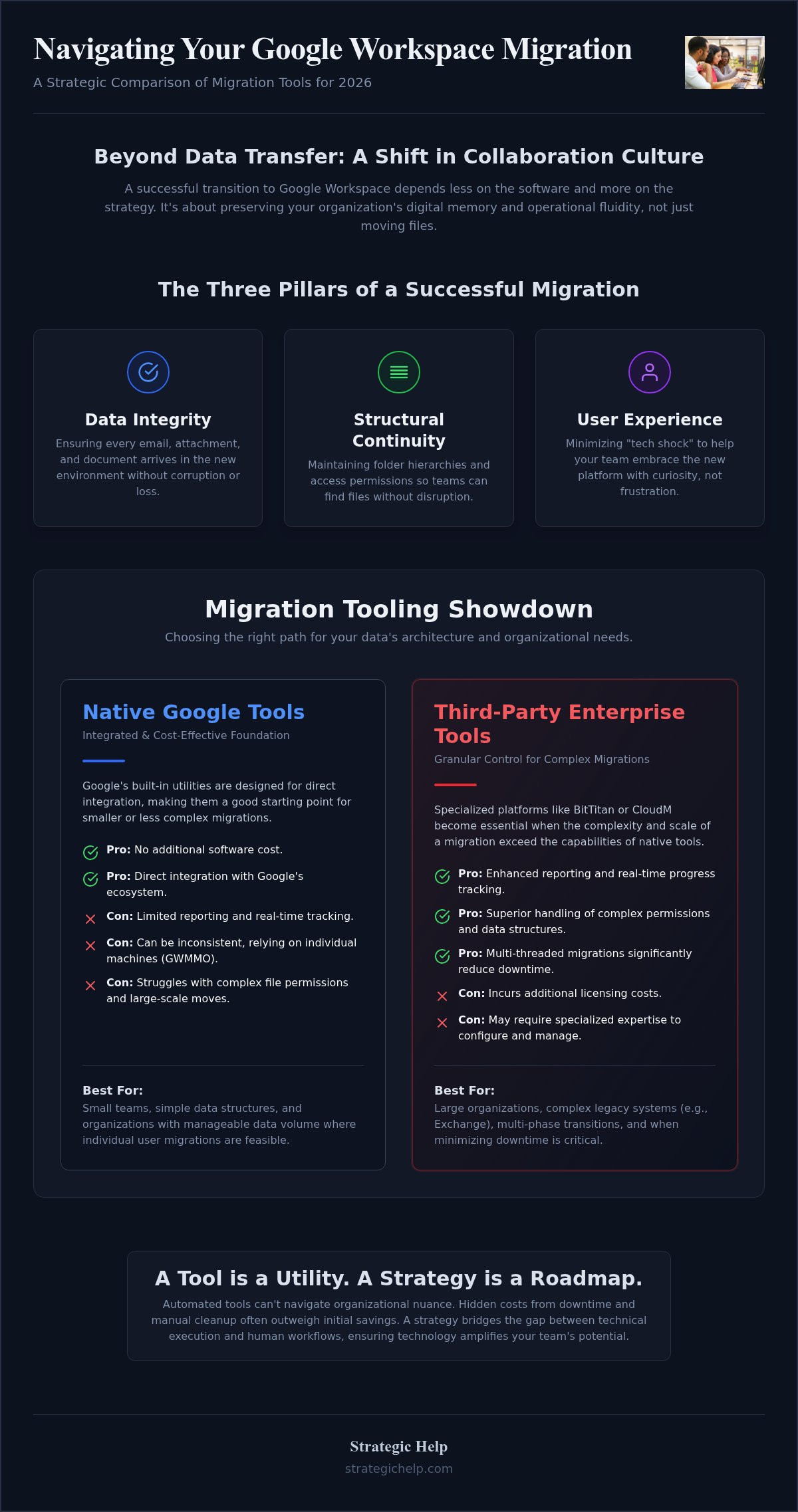
A successful move rests on three foundational elements that prioritize organizational connectivity and long-term growth. We view these pillars as the standard for any transition that aims to be more than just a technical checkbox:
- Data integrity: This ensures that every email, attachment, and document arrives safely in the new environment without corruption or loss.
- Structural continuity: This involves maintaining folder hierarchies and access permissions so your team doesn’t have to relearn how to find their files or request access to shared drives.
- User experience: By minimizing “tech shock,” you help your team embrace the new platform with curiosity rather than frustration.
Why Tools Alone Are Not a Strategy
It’s tempting to rely solely on automated scripts, but these often struggle with the nuances of a complex organization. While “free” or native Google Workspace migration tools are available, they can lead to hidden costs if they fail mid-transfer or require extensive manual cleanup afterward. These technical gaps often result in lost productivity that far outweighs any initial savings. A tool is a utility, but a strategy is a roadmap. Migration strategy is the bridge between technical tools and human workflows. By looking at the “why” behind the move, you ensure the technology amplifies your team’s potential rather than creating new hurdles.
Native Google Tools vs. Third-Party Solutions: A Comparison
Choosing between native and third-party Google Workspace migration tools requires a clear understanding of your data’s architecture. It isn’t a matter of one being “better” than the other. Rather, it’s about which one aligns with your organizational timeline and reporting needs. While native tools are accessible and integrated, third-party solutions often provide the granular control needed for complex, multi-phase transitions.
Native Google Tools: The Pros and Cons
Google offers several utilities designed for direct integration. Google Workspace Migration for Microsoft Outlook (GWMMO) is a client-side tool that allows individual users to move their own emails, calendars, and contacts. It’s a cost-effective choice for small teams with simple data needs. However, it relies on individual machines, which can lead to inconsistencies across the organization. For server-level moves, Google Workspace Migration for Microsoft Exchange (GWMME) provides a more centralized approach. While GWMME is powerful, it can be limited when handling large-scale file permissions or complex Google Drive hierarchies. These tools work well when the data structure is straightforward and the volume is manageable.
Third-Party Enterprise Tools: When to Level Up
As organizations grow, the “drag-and-drop” simplicity of native tools often hits a ceiling. This is when specialized platforms like BitTitan or CloudM become essential. These enterprise-grade Google Workspace migration tools offer enhanced reporting and real-time tracking that native options lack. They excel at maintaining structural continuity, especially when moving complicated Shared Drive permissions from a legacy server. If you’re managing a transition with thousands of users, the ability to run multi-threaded migrations can significantly reduce your downtime window. If you’re feeling overwhelmed by these technical choices, our team at Strategic Help can guide you through the selection process to ensure your data arrives exactly where it belongs.
To make the right choice, evaluate your needs based on three specific criteria. First, look at your data volume. Large file counts often require the robust processing power of third-party engines. Second, consider your speed requirements. If you have a narrow window for the cutover, enterprise tools usually offer faster transfer rates. Finally, prioritize reporting. If your industry requires a strict audit trail, the detailed logs and error-handling features of non-native tools provide the transparency you need for a risk-free migration.
Automated Tools vs. Professional Support: Addressing the DIY Trap
Relying solely on software often leads to a false sense of security. While modern Google Workspace migration tools are highly capable, they operate within the specific parameters of their code. They can’t account for the unique cultural nuances of your office or the undocumented workflows your team relies on every day. Many organizations fall into the “DIY trap,” assuming that an automated script can handle the entire transition without expert oversight. This approach often reveals hidden costs, such as significant productivity loss when a non-specialist IT staff member spends dozens of hours troubleshooting cryptic error logs.
A true risk assessment involves looking at what happens when a tool fails mid-migration. If a sync stops at 85%, does the software tell you which specific files were missed? Does it explain why a certain calendar event didn’t map correctly? Professional consultants bridge this gap by performing pre-migration audits that no software can replicate. We look for potential friction points, like oversized attachments or incompatible file types, before the first byte of data even moves. This methodical preparation ensures that your business goals, rather than just technical checklists, drive the project forward.
The Complexity of SharePoint and Teams Transitions
Moving from a Microsoft environment is particularly complex because the underlying architectures don’t always align. For example, the way permissions work in a “Shared Drive” is fundamentally different from a traditional SharePoint library. If you’re coming from a heavy Microsoft 365 setup, you might find our Microsoft 365 SharePoint configuration guide helpful for understanding these structural differences. A tool might move the files, but without expert configuration, your team could end up with broken links or restricted access to vital documents. Managing this “permissions mismatch” requires a human eye to ensure that your security standards remain intact during the move.
The Human Element: Training and Change Management
The most sophisticated Google Workspace migration tools in the world won’t help if your team doesn’t feel comfortable using the new interface on Monday morning. We’ve seen that technical success doesn’t always equal organizational success. True change management involves preparing your people for the shift, addressing their concerns, and providing post-migration support that goes beyond a simple help desk ticket. It’s about ensuring the team actually adopts the new automation features and collaborative tools you’ve worked hard to implement. Professional support provides a safety net that software cannot replicate. By prioritizing relationship-building alongside technical prowess, we help turn a potentially stressful event into a moment of growth for your entire organization.
Choosing Your Path: A Decision Framework for Your Migration
Selecting the right path requires more than just picking a software vendor. It starts with a methodical audit of your current digital footprint. You need to understand your total data volume and how your organization is structured before you begin evaluating Google Workspace migration tools. By defining your acceptable downtime window and timeline early, you can narrow down which technical routes are actually viable for your business rhythm. This prevents the common mistake of choosing a tool that can’t handle your specific scale or speed requirements.
Don’t overlook your internal IT capacity. While your team is highly capable in daily operations, a platform migration is a specialized project that often requires external expertise to avoid common pitfalls. Choosing a tool based on the complexity of your metadata and file permissions, rather than just the source server, ensures a much smoother transition. Finally, integrating Google Workspace platform planning into your roadmap allows you to look beyond the move and toward future automation opportunities. This strategic alignment ensures that your new environment is built for growth from day one.
Phase 1: The Discovery and Planning Session
Identifying “dark data” (redundant, obsolete, or trivial files) is a critical part of the discovery phase. Not everything needs to move, and cleaning your digital house before the migration reduces both cost and complexity. This is also the ideal time to map legacy workflows to modern Google Workspace automations. Setting realistic expectations now prevents frustration later, ensuring everyone in the organization understands the timeline and their specific role in the change.
Phase 2: Execution and Validation
A “Pilot Migration” strategy is the best way to test your chosen Google Workspace migration tools on a small, controlled scale before the full organization moves. This allows you to refine your validation protocols and confirm that every file, calendar event, and permission maps correctly to the new environment. Managing the “Cutover” weekend becomes a low-stress event when you’ve already verified your process through rigorous testing. If you’re ready to build a custom roadmap that prioritizes your team’s success, contact us at Strategic Help to start a conversation about your specific needs.
How Strategic Help Ensures a Calm Migration Experience
The technical complexity of a move shouldn’t overshadow the human goals of your organization. We approach every project with the mindset of a wise guide, drawing on over 20 years of experience navigating complex IT environments. While we utilize the most effective Google Workspace migration tools available, we recognize that software alone cannot account for the unique culture of your office. Our consultative approach moves beyond the simple transfer of data to focus on the long-term health of your digital ecosystem.
We prioritize relationship-building over quick technical transactions. By taking the time to understand your mission and social impact, we can align your technology with your broader organizational goals. This methodical care ensures that the transition feels supportive rather than disruptive. Acting as a steady partner, we solve the complex puzzles of legacy mapping and server configurations so your team can maintain its focus on the work that matters most. Our focus on “IT+” services means we prioritize connectivity and operational fluidity at every stage.
Custom Configuration for Modern Teams
We don’t just install software; we optimize your environment for organizational efficiency. This involves a deep dive into your Workspace settings to ensure they support your specific workflows and automation needs. In this role, we transition from being a distant vendor to acting as your outsourced department head. Taking ownership of the digital infrastructure allows us to build a system designed to amplify human connection. Beyond the initial move, we implement IT standards-based security and ongoing management tools to keep your platform running smoothly and securely.
Getting Started with Your Transition
Moving to a new platform is a significant organizational shift, and it’s natural to have questions about the best path forward. We invite you to join us for a low-pressure consultation where we can discuss your specific challenges and goals. Our aim is to provide clarity and a risk-free roadmap that respects your team’s productivity. You focus on your mission, and we’ll handle the complexities of the digital infrastructure. To learn more about our methodical approach, Explore our Thoughtful Path to Google Workspace Migration today.
Building a Resilient Digital Future
A successful transition into the Google ecosystem requires a shift from viewing technology as a chore to seeing it as a bridge for connectivity. The selection of Google Workspace migration tools is only one part of a much larger strategic puzzle. By prioritizing structural continuity and team preparation, you turn a complex technical event into a moment of organizational growth.
We believe that a calm, methodical approach is the only way to ensure a risk-free move. With over 20 years of migration expertise, we provide national service coverage that focuses on standards-based security and customized platform planning. We’re here to act as your steady partner, navigating technical nuances so you can remain focused on your mission. This partnership ensures your data is safe and your team stays productive throughout the change.
If you’re ready to move past the anxiety of data loss and downtime, we invite you to Schedule a Calm Consultation for Your Google Workspace Migration. Let’s work together to create a digital infrastructure that truly supports your team’s potential.
Frequently Asked Questions
What is the best Google Workspace migration tool for a small business?
The best tool depends on your data volume and technical comfort. For very small teams with basic Outlook setups, Google’s native GWMMO is often sufficient. If your business relies on complex file structures or requires detailed reporting, enterprise-grade Google Workspace migration tools like BitTitan or CloudM offer the granular control necessary for a smooth transition without losing folder hierarchies.
Can I migrate from Microsoft 365 to Google Workspace without losing emails?
You can move your data without losing a single message by using methodical validation protocols. The key lies in the “delta migration” phase, which captures any new emails received between the initial sync and the final cutover. Professional oversight ensures that every folder and attachment is accounted for before you flip the switch, protecting your digital memory.
How long does a typical Google Workspace migration take using automated tools?
A typical migration timeline depends heavily on your data volume and organizational complexity. While the actual data transfer might take a few days for a small office, a strategic transition usually spans several weeks. This window includes the essential pre-migration audit, pilot testing, and team training phases that ensure operational fluidity on day one of your new setup.
Is there a free tool to move my Outlook data to Google Workspace?
Google provides a free utility called Google Workspace Migration for Microsoft Outlook (GWMMO) specifically for this purpose. It’s a client-side tool that allows individual users to move their own data. While it’s cost-effective for simple needs, it requires manual setup on each machine and doesn’t offer the centralized reporting that a business owner needs for a risk-free move.
What are the risks of using third-party migration tools?
The primary risks involve technical bottlenecks like API throttling or incomplete metadata mapping. If a tool isn’t configured correctly, it might move the files but fail to preserve original timestamps or folder hierarchies. You should always vet third-party Google Workspace migration tools for security standards to ensure your sensitive business data remains protected throughout the entire transfer process.
Do I need a consultant for a Google Workspace migration if I have an IT person?
While your IT person handles daily operations, a migration is a one-time project with unique technical hurdles. A consultant brings specialized experience in mapping legacy systems like SharePoint to Google Drive. This partnership allows your internal staff to focus on their core duties while we handle the complex puzzle of the transition, ensuring a calm experience for everyone.
What happens to my shared folder permissions during a migration?
Shared folder permissions are often the most fragile part of any move. Because Google Drive and legacy servers handle access differently, permissions frequently require manual re-mapping or specialized tool configuration. A methodical approach ensures that your team retains access to their vital documents without compromising your organization’s security standards or creating unnecessary “tech shock” for your staff.
Can I migrate my Google Workspace data to another domain easily?
Moving data between domains is a common but complex task known as a domain-to-domain migration. It requires specialized tools to move emails, drive files, and settings while maintaining the integrity of your collaborative environment. We treat these moves as strategic projects to ensure that your organizational connectivity remains uninterrupted during the domain shift, prioritizing a seamless transition over a quick fix.