What if the very tools designed to help your team collaborate are actually the ones creating the most friction in their workday? It’s a common frustration. You see redundant Teams channels multiplying, sensitive files sitting in the wrong OneDrive folders, and a growing list of complex security settings that feel more like obstacles than safeguards. You likely want a digital workspace that feels organized and secure, yet many organizations find themselves stuck between “out-of-the-box” chaos and restrictive policies that stifle growth.
By implementing a thoughtful Microsoft 365 governance strategy, you can move past this tension. We believe that technology should serve as a tool for human connection, not a source of constant digital noise. This guide will show you how to balance high-level security with employee efficiency, helping you master the art of “Calm Workflows.” We’ll walk through practical steps to classify your data, manage your digital infrastructure with precision, and ensure your team has the clarity they need to do their best work in 2026.
Key Takeaways
- Learn why moving from “Governance by Default” to a strategic framework is the secret to eliminating digital noise and Teams sprawl.
- Discover how to build a Microsoft 365 governance strategy that balances robust, standards-based security with the fluidity your team needs to stay productive.
- Identify the essential roles for your governance committee to ensure that IT, HR, and business leads are aligned on how tools should be used.
- Understand the common traps of over-restriction and “set it and forget it” policies that often lead to shadow IT and employee frustration.
- Explore how custom configuration of Teams and SharePoint leads to “Calm Workflows” and a more organized, predictable digital workspace.
What is a Microsoft 365 Governance Strategy and Why Does it Matter?
A Microsoft 365 governance strategy is the framework of policies, roles, and processes that guide how your organization interacts with its digital tools. It’s the difference between a digital environment that feels like a cluttered warehouse and one that operates like a well-oiled studio. While many providers focus solely on the technical “how,” we look at governance as the bridge between your technical infrastructure and your organizational culture. It’s about creating a sustainable path forward that respects both the security of your data and the pace of your team’s work.
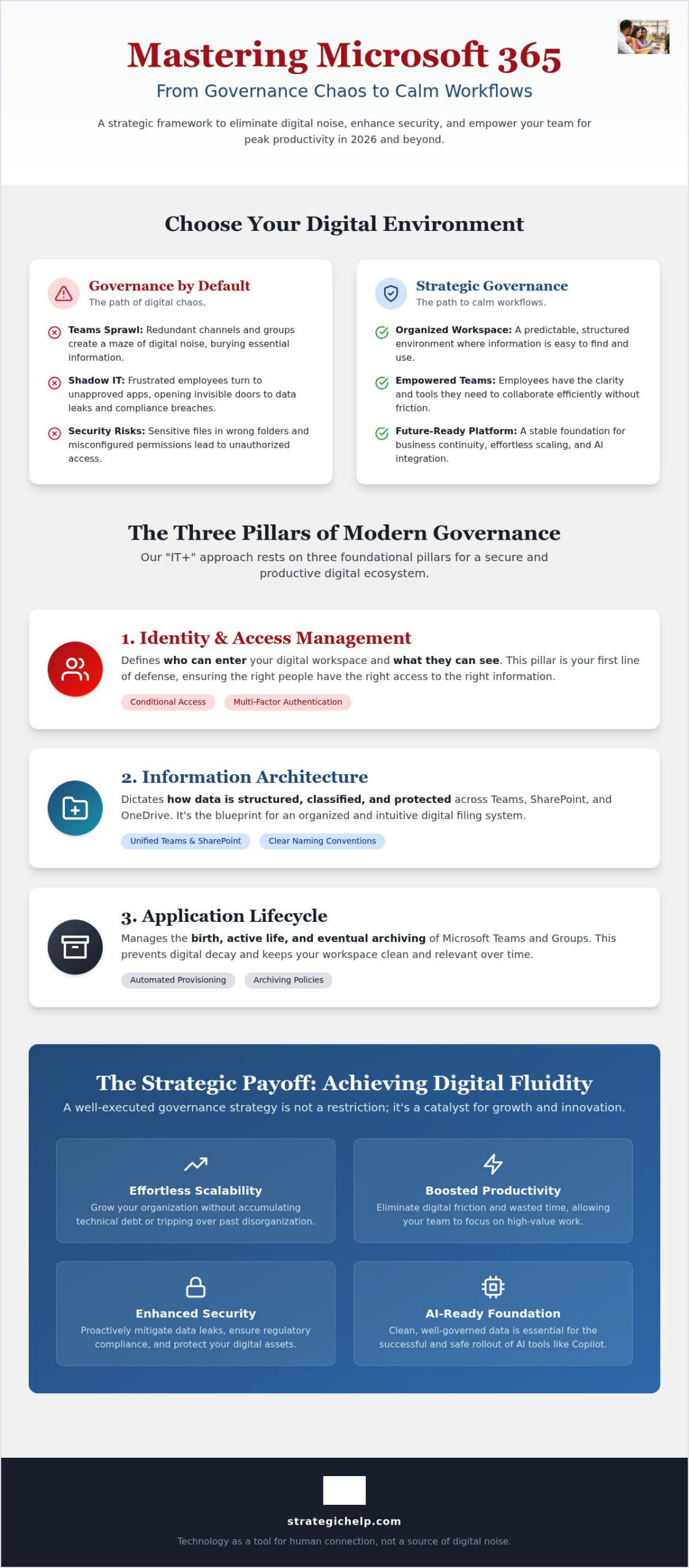
In the past, managing IT meant securing a physical server in a locked room. Today, we operate in a fluid, cloud-based ecosystem using Microsoft 365. This shift requires a move away from “Governance by Default,” where settings are left in their chaotic, out-of-the-box state. Instead, we aim for “Strategic Governance.” This approach prioritizes three core goals: protecting your assets through standards-based security, ensuring regulatory compliance, and empowering your users to work without unnecessary friction.
The Cost of Governance Chaos
Without a clear plan, organizations quickly fall victim to “Teams sprawl.” This happens when redundant channels and groups multiply faster than they can be managed, burying essential information under layers of digital noise. When employees can’t find what they need, their focus shatters. They may even turn to “shadow IT,” using unapproved personal apps to share files simply because the official system feels too difficult to use. This doesn’t just hurt productivity; it opens invisible doors to data leaks and unauthorized access. As a wise guide in this space, we’ve seen that technology only succeeds when it acts as a tool for connection rather than a source of daily frustration. Chaos is expensive, both in terms of security risk and the mental tax it places on your staff.
Governance as a Catalyst for Growth
A proactive Microsoft 365 governance strategy acts as a strategic asset for business continuity. It allows your organization to scale effortlessly because you aren’t constantly tripping over technical debt from past mistakes. When your data is properly classified and your access roles are clearly defined, you’re also building the foundation for modern innovation. For instance, the successful rollout of AI tools like Copilot depends entirely on the quality of your underlying governance. If your permissions are messy, AI might inadvertently surface sensitive executive files to a junior intern. By cleaning up the “Wild West” areas of your tenant now, you ensure that your digital workspace is a stable platform for future expansion. Strategic governance isn’t a set of restrictions; it’s the structure that makes growth possible.
The Three Pillars of Modern Microsoft 365 Governance
Successful digital environments don’t happen by accident. They’re the result of viewing your ecosystem as a single, cohesive unit rather than a collection of disconnected apps. At Strategic Help, we call this the “IT+” approach. It moves beyond simply closing support tickets and focuses on proactive platform planning. A robust Microsoft 365 governance strategy rests on three foundational pillars that ensure your data remains secure while your team stays productive.
The first pillar is Identity and Access Management. This defines who can enter your environment and what they’re permitted to see once they’re inside. By focusing on Proactive Governance in Microsoft 365, you can implement standards-based security measures like conditional access and multi-factor authentication. These tools protect your assets without creating unnecessary hurdles for your employees. The second pillar is Information Architecture, which dictates how data is structured across SharePoint and OneDrive. Finally, the Application Lifecycle pillar manages the birth, active life, and eventual archiving of Teams and Groups to prevent digital decay.
Teams and SharePoint: A Unified Strategy
Many organizations struggle because they treat Teams and SharePoint as separate entities. In reality, every Microsoft Team is built on top of a SharePoint site. Treating them as isolated products is an architectural misunderstanding that often leads to redundant folders and lost files. To achieve “Calm Workflows,” your configuration should ensure that when a team is created, the underlying SharePoint library is automatically optimized for that specific group’s needs. We also advocate for clear naming conventions. Using consistent prefixes for departments or projects prevents organizational confusion and makes it easy for users to identify the right workspace at a glance. If the technical side of this setup feels daunting, our Microsoft 365 custom management services can help align these tools with your specific business goals.
Lifecycle Management and Data Sovereignty
A healthy digital workspace requires a plan for the entire journey of your data. Lifecycle management involves setting clear procedures for offboarding users and archiving stale data so your tenant doesn’t become a digital graveyard. This is especially important when managing guest access. You should be able to collaborate with external partners easily, but those permissions must be reviewed and revoked once a project ends. Maintaining standards-based security means knowing exactly where your data lives and who has access to it at all times. In regulated industries, data retention policies are not just a best practice; they’re a requirement for compliance. A well-defined strategy ensures that your business stays protected and organized, regardless of how much your data grows.
5 Steps to Building a Microsoft 365 Governance Framework
Building a successful Microsoft 365 governance strategy requires more than technical expertise; it demands a deep understanding of how your team interacts with information. We approach this through a five-step framework designed to replace “out-of-the-box” chaos with structured, calm workflows. This isn’t a one-time project, but a methodical alignment of your digital tools with your organizational values.
First, you must assemble a governance committee. This shouldn’t be an IT-only project. By including representatives from HR and various business leads, you ensure the policies reflect real-world needs rather than just technical constraints. Once your team is in place, the second step is to inventory your current assets. This is where you identify the “Wild West” areas of your tenant, such as those redundant Teams or forgotten SharePoint sites that have grown unchecked over time.
Third, we define the rules of engagement. This involves setting clear policies for how resources are created, used, and eventually retired. The fourth step moves into technical enforcement through standards-based security. We focus on implementing Multi-Factor Authentication (MFA), Conditional Access, and Data Loss Prevention (DLP) to protect your most sensitive information. Finally, the fifth step is communication and training. High adoption rates only happen when users understand the “why” behind the rules and feel empowered by the new structure.
Discovery and Needs Assessment
Before clicking a single button in the admin center, you need to understand where your team feels the most friction. Are they struggling to find files? Do they feel overwhelmed by the number of notifications in Teams? Identifying these pain points allows you to build a framework that actually helps people work better. We also look closely at your data to identify sensitive information types that require extra layers of protection. In our experience, thorough discovery is the foundation of a consultative strategy that prioritizes long-term stability over quick fixes. Citing the official Microsoft 365 collaboration governance framework can provide additional context for these foundational steps.
Policy Implementation and Technical Configuration
Once the discovery phase is complete, we move into the actual configuration of your environment. A key goal is to enable “self-service with guardrails.” This means employees can still create the tools they need, but they do so within a structure that prevents sprawl and data leaks. We often use sensitivity labels to automate data protection, ensuring that a document marked “Confidential” stays that way regardless of where it’s shared. For those looking for deeper technical insights, our SharePoint document management setup guide offers a more detailed look at optimizing your file storage. By aligning your technical settings with your business requirements, you turn your digital workspace into a reliable asset. Teams that want to take this further can also explore how to organize company files in SharePoint without the chaos to build a truly structured and scalable information architecture.
Common Pitfalls: Why Most Governance Strategies Fail
Even the most well-intentioned Microsoft 365 governance strategy can stumble if it’s treated as a one-time project. Many organizations fall into the “Set It and Forget It” trap. They configure settings, publish a policy, and assume the job is finished. Digital environments are living things. They require continuous optimization as new features roll out and team needs evolve. A static policy quickly becomes a relic that fails to protect your assets or support your people.
Another common failure point is over-restriction. When security policies are so rigid that they prevent employees from doing their basic tasks, those employees will find workarounds. This creates a dangerous cycle of “shadow IT” that undermines the very security you’re trying to build. We also see strategies fail when they lack executive buy-in. Governance must be viewed as a business-wide strategy for continuity and growth, not just a series of technical hurdles managed by the IT department. Ignoring the user experience is equally damaging. Convoluted permission structures lead to frustration and lost time. If your team spends more time trying to figure out where to save a file than actually working on it, the framework has failed its primary purpose.
The Myth of ‘One Size Fits All’
Your governance needs are unique to your organization’s mission and size. A 10-person nonprofit doesn’t need the same heavy-handed controls as a 500-person firm with global compliance requirements. Today’s remote and hybrid work environments add another layer of complexity. They require a strategy that remains fluid enough to support work from anywhere while maintaining standards-based security. As a wise guide in this space, we help you navigate these nuances, ensuring your framework fits your specific culture rather than forcing you into a generic template. If you’re ready to move away from digital chaos, our team provides Microsoft 365 custom management to help you build a sustainable, frictionless environment.
Overcoming Resistance to Change
Resistance usually stems from a simple fear: “Will this make my job harder?” To address this, we use the concept of “Calm Workflows” as a central selling point for employees. Transparent communication is vital during the rollout. Instead of framing governance as a set of rules, frame it as a way to clear the digital clutter that causes daily stress. When people see that an organized workspace saves them 15 minutes of searching every day, adoption happens naturally. We address objections by showing how a clear structure actually provides more freedom to focus on meaningful work. Governance isn’t about saying “no”; it’s about providing a safe and clear “yes” for how your team collaborates.
The Strategic Help Approach: Achieving Digital Fluidity
At Strategic Help, we believe that managing your digital infrastructure should feel less like putting out fires and more like tending a garden. It requires a shift in perspective that we call the “IT+” philosophy. While traditional providers often focus on closing support tickets as quickly as possible, our approach centers on proactive platform planning. We don’t just fix what’s broken; we design a Microsoft 365 governance strategy that prevents the breakage from happening in the first place. This consultative relationship allows us to act as an outsourced department head, deeply interested in the nuances of your organization’s specific challenges.
The landscape of 2026 has made this proactive stance more vital than ever. With Microsoft 365 pricing updates effective as of July 1, 2026, including Business Basic at $7.00 and Business Standard at $14.00 per user, organizations must ensure they’re extracting maximum value from their investment. Rising costs and the integration of AI tools like Copilot mean that a “set it and forget it” mentality is no longer sustainable. We integrate standards-based security into every layer of your framework, ensuring that as your digital footprint grows, your risk does not grow with it. Moving from chaos to efficiency isn’t just about clicking the right buttons; it’s about aligning your technology with your mission.
Teams and SharePoint Optimization
Our methodical approach to organizing company files is designed to eliminate the daily “search fatigue” that plagues many teams. We provide custom management of your tools, specifically focusing on how Teams and SharePoint interact to create a unified experience. By configuring these platforms to support your unique business logic, we can save your team hours of lost time every week. This custom configuration moves you away from the “out-of-the-box” chaos that leads to redundant channels and misplaced documents. If you’re interested in how we structure these environments for maximum clarity, you can explore our insights on Microsoft Teams optimization for business: Calm Workflows. We help you build a workspace where information is easy to find and security is invisible yet ironclad.
Partnering for Long-Term Success
Choosing a partner for your digital journey is about finding a steady, reliable guide who understands that technology is a tool for human connection. We’ve spent over 20 years navigating digital infrastructure, and we bring that seasoned authority to every consultation. As your organization evolves, we stay beside you to optimize your workflows and adapt your governance policies to meet new regulatory or operational demands. We aren’t just another vendor; we’re an advocate for your success and social impact. If you feel your current environment is holding you back, we invite you to schedule a consultative review of your Microsoft 365 environment. Together, we can build a foundation of digital fluidity that supports your growth for years to come.
Cultivating a Sustainable Digital Future
Moving from a state of digital sprawl to one of organized fluidity is a journey that pays dividends in both security and team morale. By prioritizing identity management, information architecture, and lifecycle planning, your organization can transform its environment into a reliable asset. We’ve explored how a proactive Microsoft 365 governance strategy serves as the foundation for modern innovation, ensuring that your growth is built on a stable and secure platform.
Governance is not a static set of rules but a continuous practice of alignment. With over 20 years of digital infrastructure experience, we offer a specialized “IT+” methodology that moves beyond basic support to provide true platform planning. We act as a steady partner, advocating for your mission and helping you navigate the complexities of the 2026 cloud landscape. It’s about creating a workspace where technology supports human connection rather than hindering it.
Secure your digital assets with a custom Microsoft 365 governance strategy from Strategic Help.
Your digital workspace should be a place where your team can do their best work without the friction of technical debt. We’re here to help you solve that puzzle and achieve a state of lasting organizational calm.
Frequently Asked Questions
What is the difference between Microsoft 365 security and governance?
Security focuses on protecting your environment from external threats and unauthorized access through technical tools like firewalls and multi-factor authentication. Governance is the broader framework that defines how your organization uses those tools, including who owns specific data, how long files are retained, and the rules for creating new collaboration spaces. While security keeps the “bad actors” out, governance ensures your internal team uses the platform efficiently and safely.
Does a small business really need a formal governance strategy?
Small businesses need a Microsoft 365 governance strategy just as much as large enterprises to prevent digital chaos and data leaks. Even a team of ten can quickly suffer from “Teams sprawl” or accidentally share sensitive payroll information if clear rules aren’t in place. A smaller organization might have a simpler framework, but the core pillars of identity and data protection remain essential for long-term stability and growth.
How often should we review our Microsoft 365 governance policies?
You should review your governance policies at least quarterly to stay aligned with Microsoft’s frequent feature updates and your own organizational changes. The digital landscape in 2026 moves quickly, and a policy set a year ago may not account for new AI capabilities or shifting regulatory requirements. Regular reviews allow you to optimize your “Calm Workflows” and ensure your settings still serve your team’s current way of working.
Can governance help prevent Microsoft Teams sprawl?
Governance is the primary solution for preventing the uncontrolled multiplication of channels and groups known as sprawl. By setting policies for Team creation, implementing naming conventions, and establishing expiration dates for inactive projects, you keep your digital workspace organized. This structure helps employees find information faster because they aren’t digging through dozens of redundant or abandoned “test” channels to find a single document.
What are sensitivity labels and how do they fit into governance?
Sensitivity labels are tags you apply to content to enforce specific security and access policies regardless of where the data travels. They are a critical part of a Microsoft 365 governance strategy because they automate data protection. For example, a label marked “Confidential” can automatically encrypt a document and prevent it from being shared with anyone outside your organization, ensuring your most vital assets stay protected without manual intervention.
Who should be responsible for managing M365 governance?
Governance is a shared responsibility that should involve a committee of IT professionals, HR representatives, and business department leads. While the IT team handles the technical configuration in the admin center, business leads provide the context for how work actually gets done. This collaborative approach ensures that your policies support real-world productivity rather than just checking a technical compliance box.
How does governance affect external guest access in Teams?
Governance provides the guardrails that make external collaboration safe instead of a security risk. You can define exactly which domains are allowed to collaborate with your team and what level of access those guests have to your SharePoint document management setup and libraries. Instead of blocking external work entirely, a good strategy uses conditional access and guest reviews to ensure that partnership doesn’t lead to unintended data exposure.
Will implementing a governance strategy slow down my employees?
A well-designed governance strategy actually increases employee speed by removing the “where does this go?” confusion that causes daily friction. When your information architecture is clear and naming conventions are consistent, staff spend less time searching for files and more time on high-value tasks. The goal isn’t to create roadblocks; it’s to provide a clear, safe path that allows your team to work with confidence and focus.